Free Hidden Word Puzzle Maker — Printable Worksheet Generator
Use this free hidden word puzzle generator to create custom printable worksheets for your classroom. Enter a secret word and vocabulary clues, and download a print-ready PDF in seconds — no sign-up needed.
Create your hidden word puzzle
Membership is free.
What is a Hidden Word Puzzle?
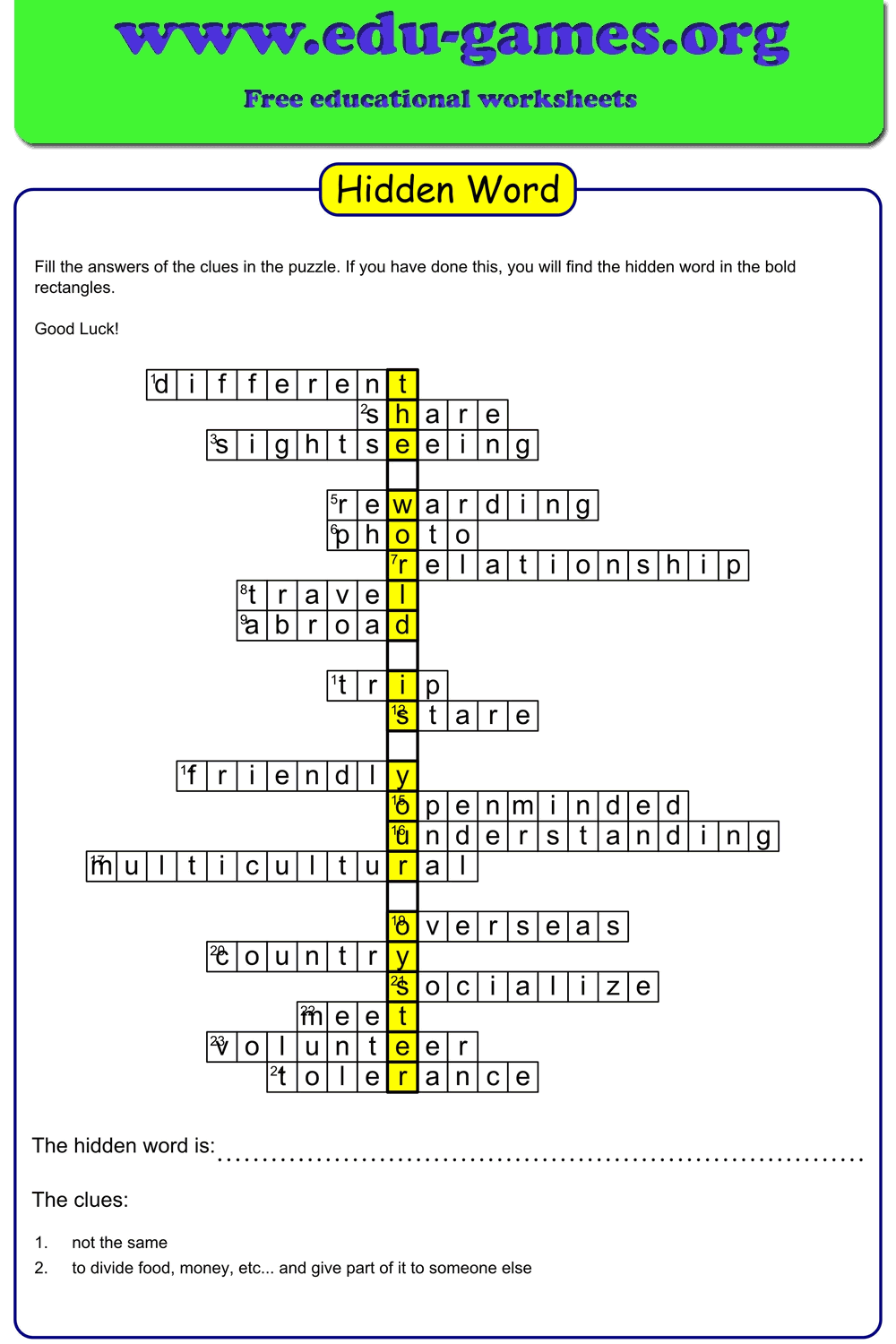
A hidden word puzzle is a vocabulary game where students answer a set of clues and write their answers horizontally in a grid. One letter of each answer word lines up in a special highlighted column — and those letters, read from top to bottom, reveal the secret hidden word.
This format is ideal for vocabulary practice, spelling review, and topic-based activities. Because every clue must be solved to uncover the hidden word, students stay engaged throughout the entire word list — not just the easy ones.
Why Use Hidden Word Puzzles in the Classroom?
Hidden word puzzles do more than keep students busy — they practise a specific set of literacy skills in a format that is easy to prepare and easy to mark. Here is what the activity actually develops.
Vocabulary Retention
To fill in a row, a student must retrieve the correct word from memory and spell it accurately. This active recall process is significantly more effective for long-term retention than passively reading a word list or matching words to definitions on a handout.
Reading Comprehension and Clue Interpretation
Each clue is a short text that must be read, understood, and acted on. Students practise reading for meaning at sentence level — a foundational comprehension skill — before they can write a single letter in the grid.
Spelling Practice in Context
Because each letter of a puzzle word must fit the grid precisely, students cannot guess or approximate spellings. A misspelled word produces a grid that does not align with the hidden word column, giving instant, visible feedback that something is wrong — encouraging self-correction without teacher intervention.
Logical Reasoning and Problem Solving
When a student is stuck, they must work backwards: look at the letter already visible in the hidden word column, think of a word that matches the clue AND contains that letter at the right position. This cross-referencing of two constraints at once builds systematic thinking skills.
Engagement and Intrinsic Motivation
The hidden word acts as a built-in reward. Students are motivated to complete every clue — not just the ones they find easy — because only a complete set of correct answers reveals the secret word. This makes the puzzle particularly effective as a whole-activity structure rather than an activity students abandon halfway through.
How to Use the Hidden Word Puzzle Maker
Step 1 — Enter a Puzzle Title
Type a descriptive title in the Puzzle Title field. The title appears at the top of the printed PDF so students immediately know the topic of the worksheet.
Step 2 — Type the Hidden Word
Enter the secret word in the Hidden Word field. This is the word students will discover after filling in all the clue answers. The length of the hidden word sets the number of rows — a five-letter hidden word creates a five-row puzzle, each row requiring one vocabulary word.
Step 3 — Add Puzzle Words and Clues
Fill in the word list with one puzzle word and its clue per row. The generator searches the Edu-Games clue library as you type — if your word is found, a clue is suggested automatically. You can keep the suggestion or write your own custom clue.
Rows highlighted in red indicate a problem: either the clue is missing, or the puzzle word does not share any letter with the corresponding letter of the hidden word on that row. Try a synonym or a different word that contains the required letter, and the red highlight will disappear.
Step 4 — Download or Save
Once all rows are correctly placed (no red rows), click "Download the Hidden Word Puzzle" for a print-ready PDF worksheet. You can also click "Download Excel" to save the word list for reuse in other Edu-Games generators, or click "Save" to store your puzzle for a future session.
Who Is This Worksheet Generator For?
The hidden word puzzle maker is a free, no-login tool designed for anyone who needs a quick, curriculum-ready vocabulary worksheet. Here is who gets the most out of it.
Grades 1–6 — Primary and Elementary Classrooms
The puzzle format scales naturally across primary and elementary grades. In Grades 1–2, teachers use short hidden words (3–4 letters) with simple, picture-based clues to practise high-frequency words and phonics. In Grades 3–4, the puzzles work well for unit vocabulary — science, social studies, or reading comprehension words — where the hidden word reveals the theme of the lesson. In Grades 5–6, longer hidden words and more challenging clues make effective review tools before a vocabulary test or end-of-unit assessment.
ESL and EFL Students
For English language learners, the hidden word format offers a structured reading and writing activity that is manageable at multiple proficiency levels. At beginner level, write clues as simple definitions or fill-in-the-blank sentences. At intermediate level, use contextual clues drawn from a class reading passage. The hidden word itself can be the week's key term, a grammar concept, or a culturally relevant word — giving the whole puzzle a clear communicative purpose. The Excel export lets teachers reuse the same word list across different activity types in a single lesson.
Literacy Centers and Early Intervention
Hidden word puzzles are a self-contained, low-preparation literacy center activity. Students work independently, read each clue, write the answer, and self-check by confirming the hidden word makes sense. This independent structure makes them ideal for guided reading rotations, morning work, or fast-finisher tasks without requiring teacher supervision during the activity.
Homeschool Families
Homeschool parents can build a puzzle around any topic — history, nature, a book the family is reading, or a hobby — in a matter of minutes. Because the tool saves puzzles and allows Excel downloads, it is easy to build a personal library of reusable vocabulary sets that grow with the child across different subjects and school years.
Special Education Support
The hidden word puzzle is a low-stress vocabulary reinforcement activity for students who benefit from structured, predictable formats. The visual layout — one word per row, one highlighted column — reduces cognitive load compared to open-ended activities. Teachers can differentiate by choosing a very short hidden word (2–3 letters), providing word banks, or pre-filling some rows. The printable PDF format also works well for resource room sessions where screen time is limited.
Share the hidden word generator with your friends