Math Triangle Worksheet Generator — Free Printable PDF
Download your first PDF in under 10 seconds — free, no account needed.
Generate printable math triangle worksheets for addition and subtraction practice. Students complete a triangle grid by filling in missing numbers — each field equals the sum (or difference) of the two fields above it. Set decimals, download as PDF, no login needed.
Used by teachers worldwide · Instant PDF download · No account required
Takes less than 10 seconds to generate
Create your Math Triangle worksheet
How the Math Triangle Puzzle Works
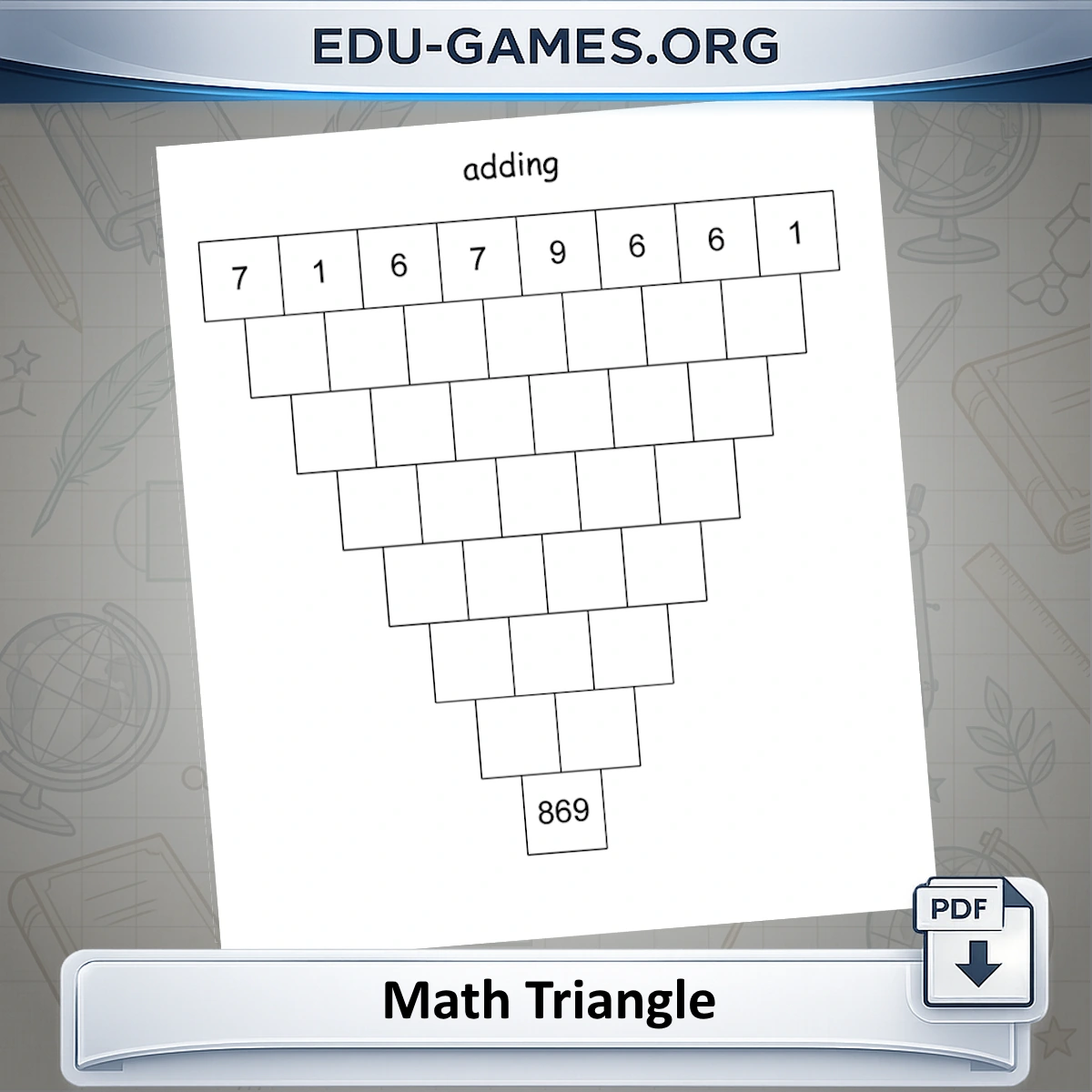
The puzzle contains a triangle of 36 cells arranged in 8 rows. The top row (8 cells) is always filled in. Students complete the rest by applying one rule from top to bottom: each cell equals the sum or difference of the two cells directly above it, depending on the mode selected.
Difficulty levels
- Level 1 — Adding, whole numbers. All starting values are positive integers (1–9). Each lower cell is the sum of the two above it. Suitable for Grade 3–4.
- Level 2 — Adding, 1 or 2 decimal places. Same addition rule, but all values carry decimals. Students must track place value through every row. Suitable for Grade 5–6.
- Level 3 — Adding with negative values. Three of the eight top-row values are negative. The operation is still addition, but signed arithmetic is required throughout. Suitable for Grade 6–7.
- Level 4 — Subtracting. Each cell equals the left cell minus the right cell above it (not larger minus smaller). Results can go negative even when the top row is entirely positive. Suitable for Grade 5–7.
Related number-grid puzzles
If your students enjoy the math triangle, try the Math Pyramid Puzzle — the same grid logic but the triangle is inverted and students work upward from a base row. For a greater challenge, the Magic Square Generator asks students to arrange numbers so every row, column, and diagonal sums to the same target.
Unlimited worksheets
Every click of "Create a new Math Triangle" generates a fresh puzzle. Download as many PDFs as you need — no account required.
How to Use Math Triangle in Your Classroom
- Choose the operation. Select Adding with positive values, Adding with negative values, or Subtracting to match your lesson objective.
- Set decimal places. Choose 0 for whole-number practice, 1 or 2 for decimal arithmetic. The setting applies to all values in the triangle.
- Click "Create a new Math Triangle". A fresh puzzle appears in the preview. Click again at any time — each puzzle is unique. Note that changing the operation or decimal setting also generates a new puzzle immediately.
- Optionally tick "Show result in the last field". This prints the bottom square's value on the student sheet — useful as a self-check target or as scaffolding for students who need extra support.
- Click "Show Solution" in the preview to verify the complete grid before printing. Click again to hide it.
- Download. Click Download to get a PDF with the student worksheet on page 1 and the full solution on page 2.
Classroom ideas
- Warm-up: hand out one sheet at the start of a numeracy lesson — most students finish in 5 to 10 minutes.
- Differentiation: generate addition (0 decimals) for one group and subtraction (1 decimal) for another. The format is identical, so no student can tell which version their neighbour has.
- Self-assessment: tick Show result in the last field and ask students to work toward that target. They can check their own answer without a teacher's key.
- Early finishers: keep a stack of pre-printed sheets at a spare-work station. Because every sheet is different, there is nothing to copy.
Why Use Math Triangle Puzzles?
Error propagation builds checking habits
A single wrong calculation in row 2 changes up to six cells in the rows below it. Students who rush quickly discover that an error cascades and makes the puzzle impossible to complete consistently. This naturally teaches them to verify each step before moving on — a habit that transfers directly to any multi-step arithmetic problem.
Subtraction mode is directionally challenging
The subtraction rule is left minus right — not larger minus smaller. This catches students who assume subtraction always produces a positive result. Intermediate rows often contain negative numbers even when the top row is entirely positive, which creates a natural discussion point for negative numbers without requiring a separate lesson.
Decimals scale difficulty without changing the format
Switching from 0 to 1 or 2 decimal places raises the arithmetic demand immediately. Students must track place value through every row, and values in lower rows can grow to four or five digits with decimals. The worksheet looks identical at every level, so you can use math triangles across a wide ability range without students feeling singled out.
Values grow naturally toward the bottom
Each addition row sums adjacent pairs, so values roughly double in scale with each step. By the bottom of an 8-row triangle in addition mode, the final number can exceed 1000. Students encounter large-number arithmetic as a natural consequence of the puzzle rules — not as a contrived extra exercise.
Learning Outcomes
- Strengthen addition and subtraction fluency through repeated, contextual practice
- Understand how numbers relate to each other within a structured arithmetic grid
- Practice error-checking: a mistake in an early row is revealed by its effect on every row below it
- Develop working memory by holding and applying calculated values across multiple steps
- Build familiarity with negative numbers and decimal arithmetic in a structured format
Frequently Asked Questions — Math Triangle Worksheets
How many squares does the student need to fill in?
28 blank squares (or 27 if "Show result in the last field" is ticked). The triangle has 36 cells in total (8+7+6+5+4+3+2+1). The top row of 8 is always pre-filled; ticking that option also reveals the single bottom cell.In subtraction mode, can intermediate rows contain negative numbers even if the top row is all positive?
Yes — subtraction regularly produces negative numbers even with a positive top row. The rule is left minus right, not larger minus smaller. Any adjacent pair where the left value is smaller than the right gives a negative result, and that negative cascades into the rows below. The solution page always shows the complete grid.What is the difference between "Adding with negative values" and "Subtracting"?
They are completely different modes. Adding with negative values uses addition as the operation throughout, but seeds three of the eight top-row numbers as negative (for example −3, −7, −2 among positive values). Subtracting keeps all top-row values positive but applies left − right between every adjacent pair of cells all the way down.How large can the number in the bottom square get?
Up to 1152 with whole numbers. The bottom cell is a weighted sum of all eight top-row values with weights from Pascal's triangle row 7 (1, 7, 21, 35, 35, 21, 7, 1). With all inputs at 9 that gives 9 × 128 = 1152. The PDF automatically shrinks the font if the number is wide.Does changing the operation or decimal setting immediately generate a new puzzle?
Yes — both the operation radio buttons and the decimal drop-down regenerate the puzzle the moment you change them. To study the current puzzle before switching, click Show Solution first.Share the Math Triangle worksheet with your friends
