Open the Safe Worksheets – Free Printable Math Puzzles, No Prep Needed
Generate printable Open the Safe puzzles in seconds — four addition and logic challenges per page, with an optional answer key. No account needed. Perfect for primary and elementary classrooms.
Free · No account needed · Instant PDF download
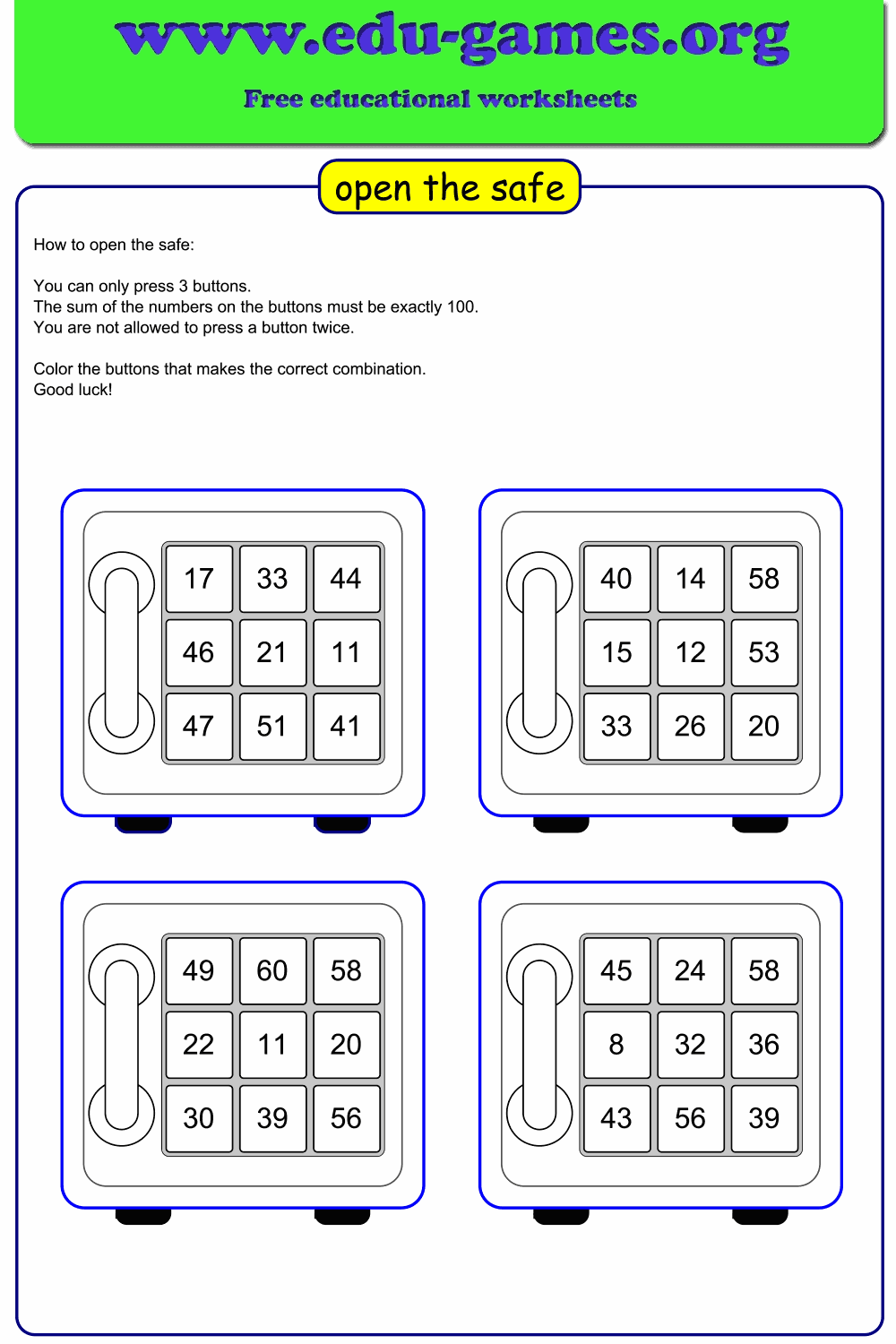
Teachers reach for this generator for dead time, fast-finisher tasks, and differentiated practice — no setup, no account, nothing to prepare in advance. Each sheet gives four independent Open the Safe puzzles: students find exactly three numbers on a numbered keypad that add up to 100 to crack the combination. Choose a 3×3 grid for a manageable challenge or a 4×4 grid when students are ready for more.
Toggle the solution on before downloading to produce an answer key from the same puzzle set — one sheet for students, one for the teacher, no separate file to create. The generator guarantees every puzzle has at least one valid solution, so students are never handed an impossible challenge.
Create your Open the Safe worksheet
What is the Open the Safe Puzzle?
Open the Safe is a printable addition logic puzzle designed for primary and elementary school students. Each puzzle presents a safe with a numbered keypad — a grid of buttons, each carrying a different number. The challenge is simple to explain: find exactly three buttons whose values add up to 100 to unlock the safe.
There is no prescribed order to follow — students must think systematically, trying combinations until they find one that works. Unlike a standard number puzzle worksheet or a routine addition drill, this puzzle requires real reasoning: part arithmetic, part logical elimination. Students are actively problem-solving, not just computing.
The Rules
- You must press exactly 3 buttons.
- The sum of the three button values must equal exactly 100.
- You may not press the same button twice.
- Colour or circle the three correct buttons on your printed sheet.
A Good Strategy
Rather than picking three buttons at random, experienced solvers fix one number first — say, 45 — then ask: "Which two other buttons add up to 55?" This reduces a three-number search to a two-number search and is much faster. Repeat for a few anchor values and the solution usually appears within a minute. Teaching students this approach builds a systematic search habit that transfers to many other problem-solving contexts.
Fast finishers can be challenged to find a second valid combination on the same puzzle — most 3×3 grids have two or three, and the 4×4 grid typically has even more.
How to Use Open the Safe in the Classroom
These printable addition challenge worksheets work in almost any lesson context. Because the rule is so simple – find three numbers that sum to 100 – no lengthy explanation is needed and students can start immediately. Whether you call them math reasoning worksheets, number puzzle worksheets, or addition problem solving activities, the format is the same: print, hand out, done.
Warm-Up Activity
Project the puzzle on the board at the start of a lesson. Give the class two minutes to find the combination individually before sharing answers. The search naturally practises addition bonds to 100 — a key number-sense milestone — and creates a focused, purposeful start to the lesson without any marking overhead.
Independent Practice
Print a sheet of four puzzles and let students work at their own pace. These printable addition games are self-contained — no tokens, no prep, no explanation after the first time. The four-per-page layout means one sheet keeps even fast workers busy, and students who finish early can be challenged to find extra combinations on any puzzle they have already solved.
Partner Work
Students work in pairs: one partner names a button to include, the other searches for two remaining buttons that make the total. This oral addition practice — "if we use 37, we need two more that sum to 63" — builds mental calculation fluency in a natural, conversational way and encourages students to articulate their reasoning.
Differentiation
Use the 3×3 grid for students still consolidating addition to 100. The smaller keypad limits the number of combinations to check, making the puzzle approachable. Switch to the 4×4 grid for students ready for a greater challenge — sixteen buttons create a much larger search space and require more systematic organisation.
Grade-Level Guidance
Grades 2–3 (Ages 7–8): Use the 3×3 grid. Focus on identifying number pairs that sum to 100 first, then find the third button. Provide a hundred chart as a support tool if needed.
Grades 4–5 (Ages 9–10): The 3×3 grid as standard practice; introduce the 4×4 grid for extension. Challenge students to find all valid combinations on a 3×3 puzzle — there are usually two or three.
Grades 6+ (Ages 11+): Use the 4×4 grid as the default. Ask students to record every combination they test and explain why each attempt works or fails — this develops systematic recording habits transferable to algebra and proof.
What Skills Does Open the Safe Teach?
Despite its simple rules, Open the Safe is one of the few addition logic puzzles that combines arithmetic fluency with genuine mathematical reasoning. Standard drill worksheets rarely ask students to do both at once:
- Addition fluency. Every attempt requires adding three numbers and checking the total against 100. Repeated practice builds speed and accuracy with mental addition in a way that feels purposeful rather than mechanical.
- Number bonds to 100. The target of 100 is deliberate — it reinforces one of the most important number relationships in the primary curriculum. Students constantly ask "what do I need to reach 100?", which is exactly the reasoning that underpins column addition, subtraction with regrouping, and later percentage calculations.
- Logical elimination. After finding one combination that does not work, experienced solvers rule it out and move on rather than re-checking it. This basic deductive reasoning — eliminating impossible options — is a foundation of mathematical proof and structured problem-solving.
- Systematic search strategies. Students who work randomly get stuck. Students who fix one number and search for two others that sum to the remaining value solve puzzles faster and learn a transferable technique applicable across mathematics and beyond.
- Persistence and self-checking. The puzzle has no scaffolding — just the numbers and the rule. Students must monitor their own progress, check their addition, and try again when a combination fails. These habits of mind are as valuable as any specific arithmetic skill.